How to Add Keywords to Amazon Listings in 2026
This post is about how to add keywords to Amazon listings in 2026, Amazon is the “everything store”, but with being the everything store how are customers supposed to find the specific thing they are looking for? That's where keywords and search terms entered into the Amazon search bar comes in. Most customers come to Amazon with an idea of what they want to buy and plug that keyword into the search bar to find the product that matches what they are searching for to purchase. From a seller’s point of view, identifying the keywords and search terms that customers use to find and search for your product, and integrating them into your listing can be help customers find and purchase your product. In 2026, sellers will need to continue to be creative on how to add keywords that not only the search bar algorithm is indexing your product but AI tools such as Rufus are indexing and surfacing the results to customers. In this post, we will go over some definitions around keywords, the tools Amazon provides to help in keyword research and generation, and how to actually add keywords to your Amazon listing.
What do we mean by Keywords on Amazon Listings?
Before we get into keyword research on Amazon for 2026, I want to define a few terms:
Search Term
Search Term is the word or phrase that gets entered into the Amazon search bar. This is the exact term spelling and all the specific terms that customers can search.
Keyword
Keyword is a generic term that can encompass many different, similar search terms. For example, “Coffee Cup” could be a keyword that encompasses the plural “Coffee Cups”. Keywords help define what a product listing page is about and help the Amazon algorithm index and surface your results.
Generic Keyword
Generic Keyword is the actual field in the back end of a Seller Central product listing where sellers can list a string of words that may be relevant to your listing to help Amazon understand what your product is.

Amazon Tools for Keyword Generation
Amazon provides several tools to help Amazon sellers perform keyword generation to find what keywords to include in their listings. This is not an exhaustive list, but geared more towards relatively newer tools or ones that will be most relevant in 2026.
Search Query Performance Report
The Search Query Performance dashboard within the Amazon Brand Analytics set of tools provides visibility into the performance of the top search terms associated with your branded products based on customer search behavior. The report surfaces query volume, impressions, clicks, add-to-cart, and buys. This is particularly helpful if you have a history of selling to review past results. This will not be helpful if you are starting your keyword research from scratch.
Product Opportunity Explorer
Using the Search Term tab within a relevant niche of the product opportunity explorer allows sellers to see the search terms that customers are searching for to find the products within that niche. This is first-hand data that can help you find both the most popular search terms but identify long-tail or more refined keywords to match what you are selling. In 2026, it will continue to be important not just to be on the indexed list, but rather to convert when you show up in search results. So use this data to find more relevant keywords, not just the ones that have the most searches.
Use Rufus for Keyword Research
In 2026, this will be one of my favorite ways to brainstorm search terms or keywords by navigating to a product listing, whether it is yours or a related competitor's, and typing into Rufus “what do people call this product?” Rufus will provide the most common terms that people search to find the product, as well as technical terms, depending on the type of product you sell. As customers use more AI tools, sellers may as well ask the tools directly how to best align the search to what they offer.
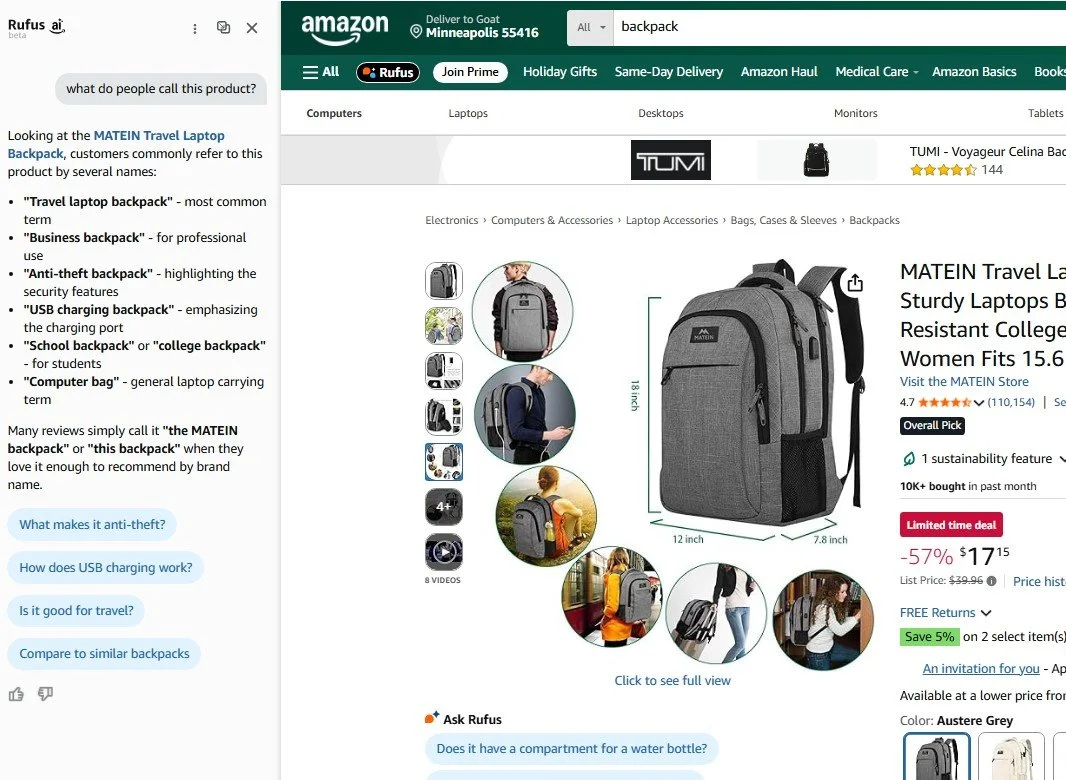
Asking Amazon Rufus “what do people call this product?” on a backpack listing
Adding Keywords to your Amazon Listing in 2026
Now that you understand what we mean by keywords and have looked at the tools to find out what keywords to use, this selection will help you understand how to best add keywords to your Amazon listings in 2026. The key strategy has not changed; sellers are trying to integrate the words that customers search to find and purchase their products into their listings so the Amazon algorithm indexes and displays their products for customers to purchase. What has changed is that the Amazon search algorithm has changed from simple keyword matching to more semantics, intent, and natural language. This means you cannot just keyword-stuff into Amazon listings and add as many words as possible. Amazon is looking for conversational language and natural-sounding descriptions. In practice, you can take those keywords and search terms and integrate the top ones into your bullet points, where you are speaking about the value propositions or use cases of your product. If you run out of room or you can’t naturally include all the keywords you want in your description, then the Generic Keyword section is a great spot for including those. This approach is more of an AEO (Agentic Engine Optimization) approach, where you are helping more of an AI agent or language processor understand your product instead of just a simple indexing approach like historical SEO (Search Engine Optimization).
Frequently Asked Questions - How to Add Keywords to Amazon Listings in 2026
How has Amazon keyword research changed in 2026?
There are more tools for researching keywords available and it is increasingly important to not keyword stuff but add keywords using natural language into your listings.
What tools on Amazon can I use for Amazon Keyword Research?
A few tools available to Amazon Sellers on Seller Central for Keyword Research include the search query performance report, product opportunity explorer, and customer search tools like Rufus or the search bar.
How can I use Rufus for Keyword Research?
Sellers can use Rufus for keyword research by asking it questions around keywords and search terms, such as, “What do customers search to find this product?”
What is the Generic Keyword field on Amazon Seller Central product detail edit?
The Generic Keyword field on Amazon Seller Central product detail edit is a place to include keywords that customers might search for your product. It is a great place to include words that don't naturally fit into your product description.
What is the best Amazon keyword strategy for 2026?
The best Amazon keyword strategy in 2026 is to integrate keywords into your product listings in a natural language (non-keyword-stuffing) approach using long-tail relevant and accurate keywords, not just the most searched terms.
Conclusion
2026 will continue to bring new changes for selling on Amazon. I hope by reading this post, you have learned of some of the ways that Amazon will be using a more natural language approach to keywords and ways for sellers to find the right keywords for their products. It is important to continue to adapt to these changes in order to maintain and grow your business on Amazon. Pairing the right keywords with your merchandising and advertising strategy will help you meet your goals for selling on Amazon. If you would like Goat Consulting to perform a keyword research refresh for you in 2026, please reach out through our contact us button below.
About the Author - Reed Thompson
This post was written by Reed Thompson, the CEO at Goat Consulting. Reed helps lead the Goat Consulting team and their clients sell on Amazon by increasing sales, mitigating risk, reducing costs, and solving problems. Reed has experience and expertise with integrating Buy With Prime for sellers on Amazon. If you want help troubleshooting or assistance with other aspects of selling on Amazon, please reach out!