Amazon Product Review Guidelines: 2026 Rules and FAQs
Updated April 2026
TL;DR: Amazon's product review guidelines live inside the Amazon Community Guidelines. Reviews can only be left by customers who spent at least $50 on Amazon.com in the last 12 months using a valid credit or debit card. Amazon prohibits incentivized reviews, family and friend reviews, review swaps, promotional language, off-topic content, and anything that violates Community Guidelines. Policy-violating reviews are flagged through the Report abuse link on the review itself, and Amazon's moderation team decides whether to remove them. Sellers cannot post public comments on reviews anymore, but Brand Registered brands can contact reviewers privately through the Customer Review Contact feature in Brand Registry.
This post covers Amazon's product review guidelines for 2026 from both sides of the marketplace, meaning the rules Amazon applies to customers writing reviews and the rules sellers need to understand when their products start accumulating reviews. It replaces an older post that was written for a very different Amazon, before Amazon shut down the Early Reviewer Program, before incentivized reviews were banned, and before Brand Registry introduced the Customer Review Contact feature. If you are managing a listing and want to know what kinds of reviews are legitimate, how Amazon handles policy violations, and what your response options are as a seller, the rules in this post are the current 2026 rulebook.
At Goat Consulting, we work with brands every day on the review lifecycle, meaning everything from generating legitimate reviews through the Request a Review button and Amazon Vine, to flagging policy-violating reviews, to responding to negative reviews through the Customer Review Contact feature when we have access through Brand Registry. Reviews sit at the core of Amazon conversion and brand trust, so it's worth the time to understand both what Amazon allows and what it actively polices.

What the Amazon Product Review Guidelines Actually Are
Amazon's product review rules are part of a broader document called the Amazon Community Guidelines, which governs every piece of customer-generated content on the site. That includes product reviews, answered questions, customer ratings, photos, videos, and discussion posts. The guidelines are written for shoppers, not for sellers, but every seller should read them at least once because the rules shape what kind of review content can legitimately exist on your listings and what Amazon will pull down.
The guidelines break into three sections that matter for sellers to know. The first is eligibility, meaning who is allowed to leave a review at all. The second is prohibited content, meaning the specific categories of review text and media that Amazon does not allow. The third is enforcement, meaning how Amazon moderates reviews and what happens when a rule is broken.
Every review that sits on your product detail page has already passed through an automated moderation check when it was submitted. Amazon's systems scan for obvious violations like URLs, hate speech, and promotional content before the review goes live. Reviews that pass automated screening show up on your listing and are re-evaluated continuously as Amazon's systems get better and as other buyers report policy-violating content. That means a review that was live yesterday can quietly disappear tomorrow if Amazon's system re-flags it, which is worth knowing when you're tracking your review count week over week.
Who Can Leave an Amazon Review
Amazon sets a real minimum eligibility bar on who can leave a review, and the rule is stricter than most sellers assume.
To submit any product review, rating, or answered question, the reviewer's account must meet all of the following conditions:
The reviewer must have spent at least $50 on Amazon.com in the past 12 months using a valid credit or debit card. Gift card balance and promotional balance do not count toward the $50 threshold.
The reviewer must have an active Amazon.com account in good standing.
The reviewer cannot be affiliated with the product or the brand, meaning they cannot be the seller, an employee of the seller, a family member of the seller, or receive any compensation for the review.
The reviewer must follow the Community Guidelines every time they submit content.
The $50 threshold is the part that surprises most sellers. A brand-new Amazon customer who just bought your product cannot leave a review on that purchase unless they have already spent $50 elsewhere on Amazon.com in the prior year. That's why the Vine program and the Request a Review button both matter for new brands, because they get the right content in front of customers who already meet the eligibility threshold.
One-day-shipped orders, digital orders, and orders fulfilled outside Amazon do still count toward the $50 threshold as long as they were placed on Amazon.com. Orders placed on international Amazon sites, such as Amazon.ca or Amazon.co.uk, do not count toward the U.S. threshold.
Verified Purchase vs. Non-Verified Purchase
There is an additional layer on top of basic eligibility called the Verified Purchase badge. When a reviewer buys the specific product they are reviewing directly from Amazon.com at a non-heavily-discounted price, Amazon flags the review as a Verified Purchase. Non-verified reviews are still allowed, and reviewers who buy a product somewhere else and then review it on Amazon can still post, but Amazon gives Verified Purchase reviews more weight in review sorting, star rating calculation, and moderation trust.
What Amazon Allows and Doesn't Allow in Reviews
The Community Guidelines call out a long list of prohibited content. Treat the list below as the 2026 version of what Amazon actively polices, because the categories have expanded over the years and the enforcement has tightened significantly since Amazon's review integrity overhaul in 2022 and 2023.
Incentivized Reviews Are Banned
Amazon banned incentivized reviews in October 2016, with the single exception of the Amazon Vine program, where Amazon itself controls the incentive. That ban has not loosened in the years since. A review is incentivized if the reviewer received any of the following in exchange for writing it: a free product, a discounted product, a refund, a gift card, a PayPal payment, a promise of future compensation, or any other form of value.
Review-for-product services, review swaps between sellers, and "leave a review to get a gift card" inserts are all prohibited and are the fastest route to a listing being removed and an Amazon notification of restricted products removal. Amazon's internal systems are good at detecting review patterns associated with these schemes, and account suspensions tied to review manipulation are common and difficult to appeal.
Family, Friend, and Employee Reviews Are Banned
The Community Guidelines specifically disallow reviews from anyone with a personal or business relationship to the product. That includes family members of the seller or brand, employees of the seller or brand, anyone who stands to financially benefit from a review, and competitors of the seller. A single bad review from a competitor can be flagged through the Report abuse link and pulled if Amazon's investigation backs it up.
Promotional Content, URLs, and Off-Topic Content Are Banned
Amazon does not allow reviews to contain URLs, HTML, phone numbers, email addresses, or physical addresses. Reviews also cannot reference other products, make cross-seller comparisons with brand names, or direct the reader to buy from a different source. Off-topic content like repeated complaints about delivery drivers or packaging is technically allowed but Amazon gives less weight to reviews that don't actually describe the product.
Prohibited Review Categories at a Glance
| Category | What's Prohibited |
|---|---|
| Incentivized content | Free products, discounts, gift cards, refunds, or any payment in exchange for a review (Vine is the sole exception). |
| Conflict of interest | Reviews from sellers, brand owners, employees, family, friends, and competitors. |
| Promotional text | URLs, HTML, phone numbers, email addresses, physical addresses, or links to external sites. |
| Offensive content | Profanity, hate speech, sexual content, threats, harassment, or personally identifying information. |
| Off-topic content | Reviews that focus on delivery experience, packaging complaints, or unrelated personal stories. |
| Plagiarism | Content copied from another review, a product listing, or any other source. |
| Illegal activity | Content that describes or encourages illegal activity, including drug references on consumer products. |
| Duplicate reviews | Posting the same review on multiple products or multiple versions of the same product. |
Can You Respond to Amazon Reviews as a Seller?
The short answer is that public seller comments on reviews were deprecated by Amazon in 2020 and the feature is not coming back. If you remember seeing "Comment from the seller of the product" text on older reviews, that feature is gone and Amazon removed the public comment box from the review interface. Any comments that existed on reviews before the deprecation are still visible on old reviews, but no new ones can be added. What replaced public comments depends on whether you are enrolled in Brand Registry.
For Brand Registered Sellers: Customer Review Contact
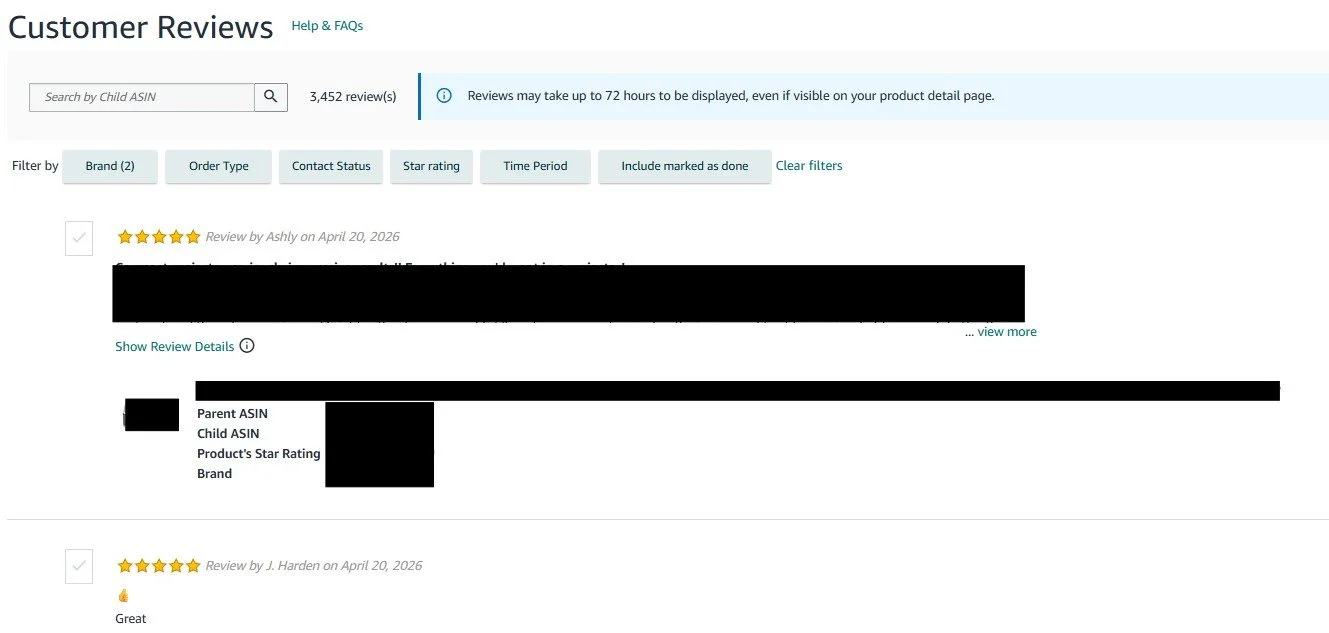
If you are enrolled in Amazon Brand Registry, you have access to the Customer Review Contact feature inside the Manage Customer Engagement hub in Seller Central. This feature lets you privately contact reviewers who left a critical review (1, 2, or 3 stars) on a product in your brand catalog. You can send a templated message that either offers a full refund or provides customer support, and Amazon mediates the message so the customer's email address is not exposed to you.
Customer Review Contact is the closest thing to a direct seller response that currently exists. Not every critical review is eligible for contact, and the outreach window is time-limited after the review is posted, but when a review is eligible you can turn a 1-star complaint into a 4-star update if the issue gets resolved. For brands that want a stronger review response program, we typically set up an internal cadence to check for eligible reviews weekly.
For Non-Brand-Registered Sellers
Without Brand Registry, the only path to address a negative product review is to flag policy violations through Report abuse. There is no seller-to-buyer response channel available. Reviews that are legitimate, even if they are critical, have to be addressed through product improvements and listing updates rather than direct response.
This is one of many reasons we push brands to enroll in Brand Registry as an early account-management priority. The Customer Review Contact feature alone has a meaningful impact on long-term review health.
Product Reviews vs. Seller Feedback
Amazon has two separate customer-feedback systems, and sellers confuse them constantly. Understanding the difference matters because the response paths are entirely different.
Product reviews are about the product itself, appear on the product detail page below the A+ Content and bullets, and are eligible for display under every offer on that ASIN. All sellers of an ASIN share the same review pool. Product reviews cannot be removed by Amazon Support for being negative, only for violating Community Guidelines.
Seller feedback is about the seller's performance on a specific order, appears on the seller's storefront page (not on the product detail page), and only affects the individual seller who fulfilled that order. Seller feedback is tied to the transaction, not the ASIN. Amazon does allow removal of seller feedback in certain cases, such as when the feedback is actually about the product rather than the seller, or when it violates the feedback guidelines.
If a buyer leaves negative seller feedback about a product defect, Amazon will often remove the feedback on request because it is product-related, not seller-related. If a buyer leaves a negative product review about shipping or packaging, Amazon usually leaves the review up because those topics are technically allowed, just weighted lower.
How to Report a Policy-Violating Review
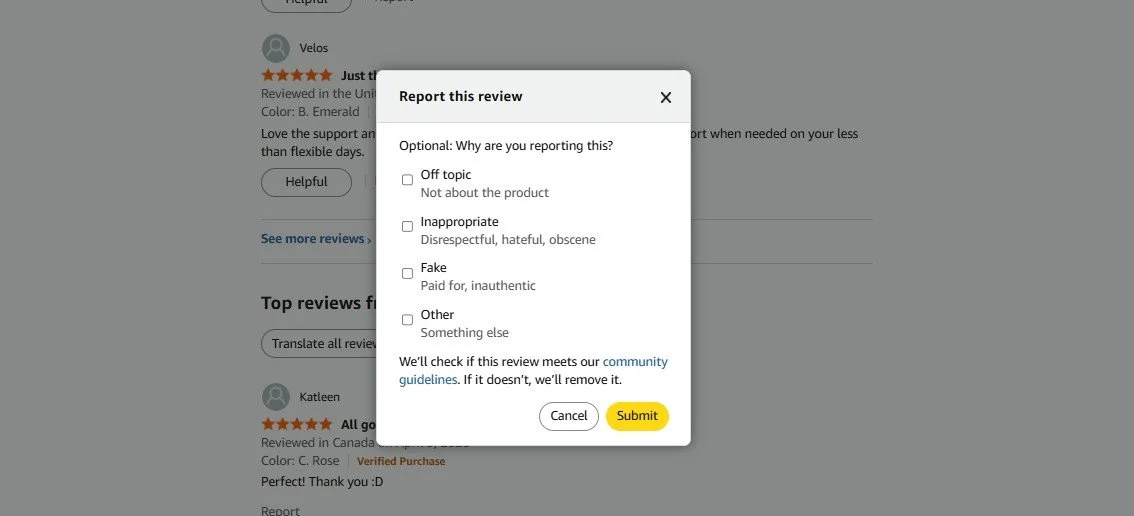
When a review violates the Community Guidelines, use the Report abuse link at the bottom of the review. Select the specific reason, for example "Offensive, inappropriate, or incorrect," "Contains inappropriate content," or "Not a review of this product." Reports are reviewed by Amazon's moderation team, and you will get a decision within a few days to a few weeks.
For reviews that involve clear policy violations like competitor sabotage, incentivized content patterns, or review manipulation, Brand Registered sellers can also submit a report through the Report a Violation tool in Brand Registry, which routes the issue to Brand Registry's internal team rather than general community moderation. The Brand Registry tool typically resolves reports faster than the public Report abuse link because it goes to a more specialized queue.
If the review appears to be part of a coordinated review manipulation campaign against your listing, document the pattern (multiple reviews in a short window, overlapping language, similar timing) and escalate through Amazon's Account Health team or a specialized compliance partner. Coordinated sabotage is real and Amazon does act on it when the evidence is clear.
Never retaliate by leaving fake reviews on a competitor's listing. Amazon's systems detect the pattern, and the account that leaves the fake reviews almost always gets flagged faster than the account that is being sabotaged. Need help managing reviews and the rest of your catalog? Explore our full Amazon consulting services.
Amazon Product Review Guidelines FAQ
-
A reviewer must have spent at least $50 on Amazon.com in the past 12 months using a valid credit or debit card, hold an active account in good standing, and not be affiliated with the brand, seller, or product. Gift card balances and promotional credits do not count toward the $50 threshold. The reviewer must also follow the Community Guidelines every time they submit content.
-
No. Amazon's Community Guidelines prohibit any review from the seller, an employee of the seller, a family member of the seller, or anyone with a financial interest in the product. Reviews from these parties are a direct conflict of interest and are the fastest path to an account suspension for review manipulation.
-
No. Amazon banned incentivized reviews in October 2016. The only exception is the Amazon Vine program, where Amazon itself controls the free product distribution and flags the resulting review with a Vine Voice badge. Any external program that offers free or discounted products in exchange for reviews violates the Community Guidelines.
-
Public seller comments on reviews were deprecated in 2020. Brand Registered sellers can privately contact reviewers of critical reviews through the Customer Review Contact feature inside Brand Registry's Manage Customer Engagement hub. Non-Brand-Registered sellers do not have a direct response channel and have to address negative reviews through product improvements and listing updates.
-
Click the Report abuse link at the bottom of the review on the product detail page and pick the reason that best fits the violation. Brand Registered sellers should also submit a report through the Report a Violation tool in Brand Registry, which routes to a more specialized moderation queue and usually resolves faster. Amazon's team reviews reports and removes content that violates the Community Guidelines.
-
After a reviewer submits a review, it typically takes between a few hours and 72 hours for the review to appear on the product detail page. Amazon runs automated screening on every submission, and reviews that require manual moderation can take longer. Reviews from accounts with fewer prior reviews or newer accounts often wait longer than reviews from long-standing reviewers.
-
Product reviews describe the product itself and appear on the product detail page below the A+ Content. All sellers of an ASIN share the product review pool. Seller feedback describes the seller's performance on a specific order and appears on the seller's storefront page. Seller feedback can often be removed when it is actually about the product rather than the seller, while product reviews can only be removed for Community Guideline violations.
-
No. Amazon does not remove negative reviews simply because a seller disagrees with them. Removal only happens when a review violates the Community Guidelines, meaning incentivized content, conflict of interest, promotional language, offensive content, plagiarism, or similar violations. A legitimate, on-topic negative review will stay up regardless of how inconvenient it is for the seller.
-
Product reviews are tied to the ASIN, not to the seller. Every seller listing against the same ASIN sees the same review pool on the detail page. This is why hijackers on your listing can accumulate sales credit from the reviews you generated, and why protecting ASIN control through Brand Registry and proactive listing monitoring matters for review health.
-
Yes, but with limitations. Buyers who meet the $50 eligibility threshold can leave non-verified-purchase reviews on products they did not buy through Amazon. These reviews are allowed but Amazon weights them less than Verified Purchase reviews in star rating calculations and review sorting. The Verified Purchase badge is only awarded when the specific review is tied to a non-heavily-discounted order for that exact product on Amazon.com.
Reviews are one of the highest-leverage levers in the Amazon algorithm, so the rules around them are worth understanding deeply. For 2026, the operating rulebook is the Amazon Community Guidelines, the eligibility threshold is $50 spent on Amazon.com in the prior 12 months, incentivized reviews and conflict-of-interest reviews are banned with Vine as the sole exception, and Brand Registered sellers have the Customer Review Contact feature for private outreach on critical reviews. Non-Brand-Registered sellers have to work through Report abuse and listing improvements instead of direct response.
If you manage a brand on Amazon, put three things on the roadmap. First, enroll in Brand Registry so you have access to Customer Review Contact and the Report a Violation tool. Second, build a monthly cadence to read every new 1, 2, and 3-star review on your top ASINs and flag any that violate the Community Guidelines. Third, use the Request a Review button in Seller Central on every eligible order within the review request window, because it is the cleanest, lowest-risk way to build legitimate review volume on new products.
Amazon's review integrity program has only tightened since 2020, and it will keep tightening. Stay inside the rules, build review volume through legitimate channels like Vine and Request a Review, and use Brand Registry's tools to address the reviews that deserve follow-up.
About the Author - Liz Carson
This post was written by Liz Carson, an Account Manager at Goat Consulting. Liz helps brands and manufacturers sell on Amazon successfully through product and market research, listing optimization, and strategic account management, and specializes in the review lifecycle across negative customer experience (NCX) rate, product review management, and customer engagement. If you want help building a legitimate review program, flagging policy-violating reviews, or setting up Customer Review Contact in Brand Registry, please reach out through our contact form.
