Amazon Product Title Requirements: The 75-Character Update
This post covers the changes to Amazon product title requirements that take effect on July 27, 2026, what you need to do as a seller before that date, and a practical approach to rewriting your titles and using the new Item Highlights field. If you sell on Amazon, your product title is one of the first things a customer sees, and starting this summer the rules for what fits in that title are changing in a way that touches almost every listing you manage.
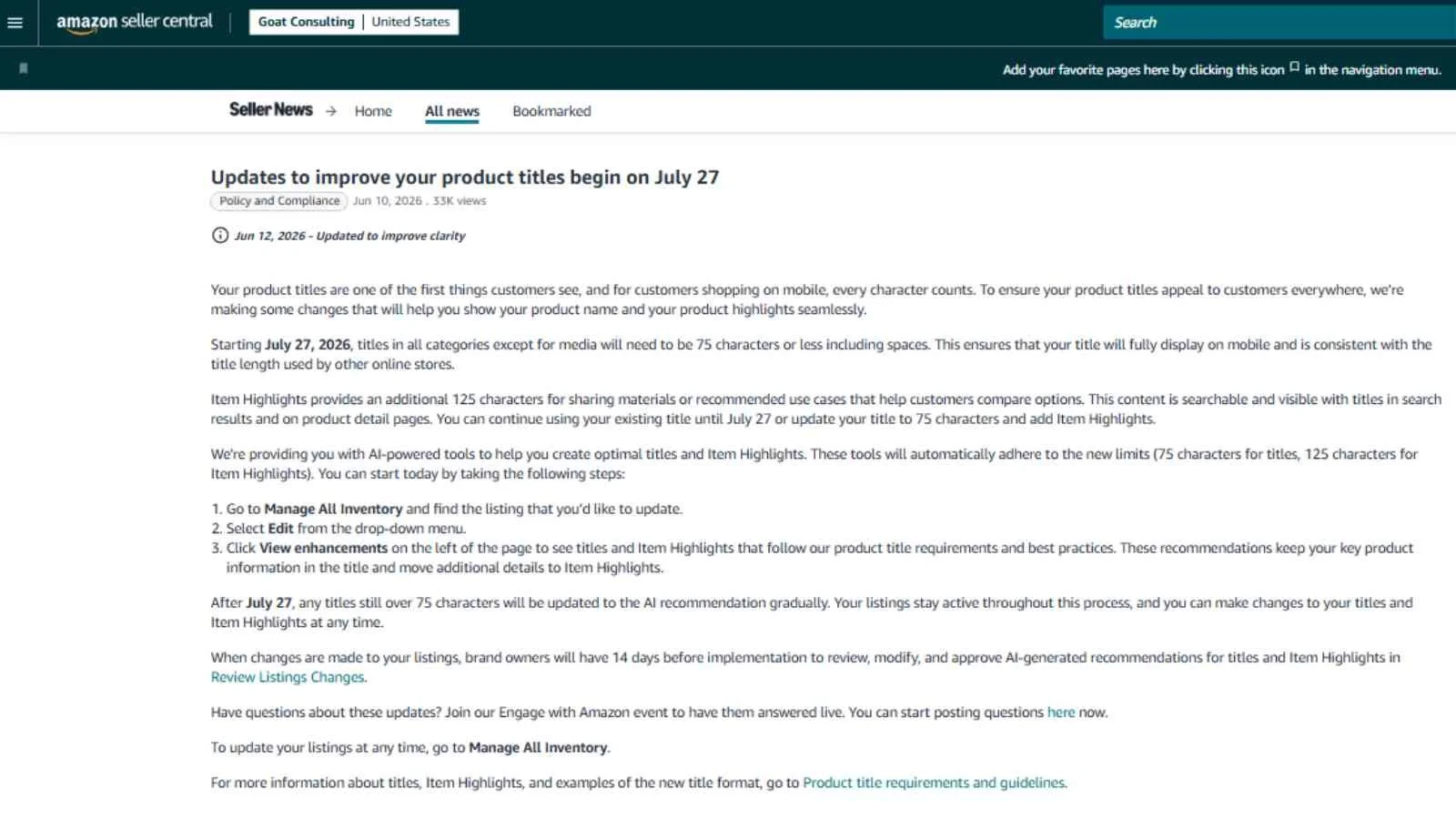
Here's the short version. Starting July 27, 2026, product titles in every category except media need to be 75 characters or less, including spaces. Amazon is also adding a field called Item Highlights that gives you up to 125 searchable characters for the details that no longer fit in the title. You can update your titles now, or Amazon's AI tools will start updating them for you after the deadline. The sellers who come out of this in the best shape are the ones who rewrite their own titles on their own terms before Amazon does it automatically.
What's Changing With Amazon Product Title Requirements on July 27, 2026
There are two parts to this update, and they work together. The first is the new length limit. As of July 27, 2026, titles in all categories except media (books, music, and video) need to be 75 characters or fewer, including spaces. For most sellers that's a significant cut, since many categories previously allowed up to 200 characters and a lot of listings have grown to fill that space over the years.
The second part is the new Item Highlights field. Item Highlights gives you an additional 125 characters to share things like materials or recommended use cases that help customers compare options. This content is searchable, and it shows up next to your title in search results and on the product detail page. Amazon laid all of this out in its Seller News announcement, and the specifics live on Amazon's product title requirements and guidelines help page.
You have a choice in the meantime. You can keep using your existing title until July 27, or you can shorten it to 75 characters and add Item Highlights today. Either way, the deadline is the point at which the new requirement is enforced across the catalog.
Why Amazon Is Capping Titles at 75 Characters
It helps to understand the reasoning, because it points you toward titles that will actually perform. Amazon's stated goal is making titles appeal to customers everywhere, and the biggest driver is mobile. On a phone screen, a long title gets cut off, so the words past the truncation point do nothing for the shopper trying to decide between a few similar products. A title built to fill 200 characters reads as clutter on mobile, and clutter makes it harder for a customer to understand what the product is at a glance.
A 75-character limit forces every title to lead with what matters. When a customer can read your full title on their phone and immediately understand the product, they're more likely to trust the listing and click into it, and that clearer shopping experience is what tends to produce better outcomes for sellers. This is the throughline worth keeping in mind as you rewrite: the change is framed around the customer, so titles written for the customer rather than for keyword volume are the ones that will hold up.
What Happens If You Don't Update Your Titles Before July 27
Nothing breaks, and your listings stay active. But after July 27, any title still over 75 characters will be updated to Amazon's AI recommendation gradually, and that happens whether or not you've weighed in. Amazon's AI tools generate a shortened title and a matching Item Highlights entry, and the recommendations are designed to keep your key product information in the title while moving the extra details into Item Highlights.
The reason to act first is control. When you let the AI rewrite a title, you're trusting an automated system to decide which of your words are the most important ones to keep, and it won't always make the same call you would about your brand or your best keywords. You can still edit your titles and Item Highlights at any time after an automatic update, but it's a lot less work to write the version you want once than to review and fix automated changes across a catalog later.
The 14-Day Brand Owner Review Window
If you own your brand, you get an extra layer of control. When Amazon makes changes to your listings, brand owners have 14 days before implementation to review, modify, and approve the AI-generated recommendations for titles and Item Highlights through the Review Listings Changes tool in Seller Central. That window is only useful if you're enrolled and paying attention, so it's worth confirming your enrollment status if you're not sure. We walk through how to do that in our guide on how to check if you're enrolled in Amazon Brand Registry.
Treat the 14-day window as a safety net, not a plan. It's there to catch automated changes you haven't gotten to yet, but the better approach is to rewrite your priority listings yourself so the AI has nothing to change in the first place.
How to Update Your Product Titles in Seller Central
Amazon has built the new limits directly into the editing tools, so the AI suggestions you see will already fit within 75 characters for the title and 125 for Item Highlights. To see them for a given listing:
Go to Manage All Inventory and find the listing you want to update.
Select Edit from the drop-down menu next to the listing.
Click View enhancements on the left of the page to see suggested titles and Item Highlights that follow Amazon's product title requirements and best practices.
The suggestions keep your core product information in the title and move the additional details into Item Highlights. They're a reasonable starting point, but they're a starting point, not a finished answer. Read each one against what you know about how your customers actually search and what makes your product different, and edit from there.

A Smart Approach to Rewriting Titles in 75 Characters
Rather than work through your catalog listing by listing in whatever order it loads, it pays to be deliberate. Here's the approach we use when we help clients through a change like this.
Start With an Audit and Prioritize Your Best Sellers
Pull your inventory and find the listings whose titles run over 75 characters, since those are the ones Amazon will eventually rewrite. Then rank that list by what each listing is worth to you, using recent sales and traffic, not just SKU order. Your top sellers and your most-searched listings are where an automated title change can do the most damage, so those are the ones to rewrite by hand first. If you have variation families, handle them together, because a parent and its children should read consistently. We cover how those relationships work in our post on Amazon product variations.
Use a Title Formula That Fits 75 Characters
Seventy-five characters goes quickly, so give every word a job. A reliable structure is brand, then the core product or product type, then the one or two attributes a customer most needs to tell your product apart from the next one. Lead with the terms a shopper would actually type or scan for, and drop the filler that crept in over the years, including repeated words, redundant synonyms, and long strings of use cases. If a word isn't helping a customer understand or find the product, it's taking up space that a better word could use. A helpful tip is to use =LEN(cell) in Excel to count the number of characters in a cell.
Protect the Keywords That Actually Drive Sales
The real risk in cutting a title down is losing the search terms that bring you traffic. Before you trim, know which keywords matter, then make sure the highest-converting ones stay in the title and the rest move into Item Highlights, which is searchable. That way you stay within the limit without giving up the indexation those terms provide. If you're not sure which keywords carry your listings, this is the moment to find out, and our Amazon keyword research and market analysis work is built around exactly that question.
How to Use the Item Highlights Field (125 Characters)
Think of Item Highlights as the home for everything true and useful about your product that no longer earns a spot in a 75-character title. Good candidates are materials, dimensions, compatibility, included quantities, care instructions, and the specific use cases that help a customer decide whether the product fits their need. Because the field is searchable, it's also where your secondary keywords belong, so the terms you pull out of the title still get indexed.
The same customer-first logic applies here. Item Highlights shows up next to your title in search and on the detail page, so write it to help a shopper compare your product against the alternatives, not to stuff in every keyword you can think of. Clear, specific, comparison-friendly detail does more for your conversion rate than a dense list of terms, and it reads as more trustworthy. If you want help auditing your catalog and rewriting titles and Item Highlights before the deadline, or with other parts of selling on Amazon, our team can help through our Amazon merchandising services.
A Plush Goat Example: Before and After
Here's how this looks in practice. Say you sell a plush stuffed goat toy, and your current title has grown over the years to pack in every keyword and gift occasion you could fit. Under the old limit it might look like the "before" row below, at 206 characters. To meet the new requirement, you'd cut it down to a focused 75-character title and move the rest into Item Highlights, like the "after" rows.
| Field | Content | Characters |
|---|---|---|
| Before (old title) | GoatToys Super Soft Plush Stuffed Animal Goat Toy 12 Inch, Cuddly Farm Animal Plushie for Kids Toddlers Boys Girls Babies, Machine Washable Stuffed Goat Gift for Birthday Christmas Baby Shower Nursery Decor | 206 |
| After (new title) | GoatToys Plush Stuffed Goat, 12-Inch Soft Cuddly Farm Animal Toy for Kids | 73 |
| Item Highlights | Machine-washable plush; gift for birthdays, Christmas & baby showers; soft nursery decor for toddlers, babies, boys & girls | 123 |
Notice what stayed and what moved. The new title leads with the brand, says plainly what the product is (a plush stuffed goat), and keeps the two details a shopper cares about most, the 12-inch size and that it's a soft, cuddly farm animal toy for kids. The gift occasions, the washability, and the nursery angle didn't disappear, they moved into Item Highlights, where they're still searchable and still help a customer compare. The result reads cleanly on a phone, and you didn't surrender the terms that bring in traffic.
Frequently Asked Questions on Amazon Title Change
-
As of July 27, 2026, product titles in every category except media must be 75 characters or less, including spaces. Before this change, most categories allowed up to 200 characters. The shorter limit applies to the title only, and you can add more detail in the new Item Highlights field.
-
Starting July 27, 2026, Amazon requires titles in all non-media categories to fit within 75 characters, including spaces. Amazon says this keeps titles fully visible on mobile and consistent with other online stores. Titles that stay over the limit will be rewritten by Amazon's AI tools after the deadline.
-
Item Highlights is a new field that gives you up to 125 characters to share materials, features, or recommended use cases that help customers compare products. It appears alongside your title in search results and on the product detail page, so it's a place for details that no longer fit in the 75-character title.
-
Yes. Amazon has confirmed that Item Highlights content is searchable and is shown with titles in search results and on detail pages. Because the field is indexed, it's the natural home for important keywords that you have to remove from the title to meet the 75-character limit.
-
Your listings stay active, but after July 27, 2026, Amazon will gradually update any title still over 75 characters to its AI recommendation. You can edit your titles and Item Highlights at any time. Brand owners get 14 days to review, modify, and approve the AI recommendations before they take effect.
-
The 75-character limit applies to all categories except media, such as books, music, and video. Every other category, including the ones most third-party sellers use, needs titles of 75 characters or less, including spaces, by July 27, 2026.
-
It doesn't have to. If you keep your highest-converting keywords in the title and move secondary terms into the searchable Item Highlights field, you can stay within 75 characters without losing indexation. Clearer titles often improve mobile click-through, which supports ranking over time.
Amazon Title Changes Conclusion
The Amazon product title requirements changing on July 27, 2026 come down to a 75-character title limit in every category except media, plus a new 125-character Item Highlights field that's searchable and shown alongside your title. The sellers who handle this well will audit their catalog now, rewrite their best-selling listings by hand, keep their highest-value keywords in the title, and move the rest into Item Highlights rather than waiting for Amazon's AI to make those calls for them.
If you only do one thing this week, find your highest-revenue listings with titles over 75 characters and rewrite those first. Then work down the list by value, and if you're a brand owner, keep an eye on the Review Listings Changes tool so any automated updates don't slip through without your sign-off. Doing the work before the deadline is how you keep control of how your products show up.
One note on timing and policy: Amazon updates its requirements and tools regularly, and the details here reflect Amazon's announcement as of June 2026. Before you make catalog-wide changes, confirm the current requirements on Amazon's product title requirements and guidelines help page in Seller Central, since the specifics can be adjusted before or after the rollout.
About the Author - Reed Thompson
This post was written by Reed Thompson, the CEO at Goat Consulting. Reed helps lead the Goat Consulting team and their clients sell on Amazon by increasing sales, mitigating risk, reducing costs, and solving problems. Reed and the team have rewritten and optimized thousands of Amazon listings, and they know how to shorten a title to meet Amazon's requirements without giving up the keywords and clarity that drive sales. If you want help auditing your catalog and updating your titles and Item Highlights before the July 27 deadline, or assistance with other aspects of selling on Amazon, please reach out through our Contact Us form.