Amazon's New Rule for AI-Generated Images in Listings
This post covers a new Amazon requirement that affects any seller who uses artificial intelligence to create images for their listings or A+ Content. As of July 2026, if a product image or video contains a photorealistic person who was generated entirely by AI, you now have to tag that file with a specific piece of metadata before you upload it to Amazon. If you don't, Amazon can flag the media, and a listing without a compliant main image can end up suppressed from search until you fix it. This post explains exactly what the rule requires, when it applies and when it doesn't, how to add the tag on Windows, macOS, and through the command line, and how to keep using AI-generated images on Amazon without creating a compliance problem for yourself.
This is a brand-new policy, so most sellers haven't seen it yet. Getting ahead of it now is the easiest way to avoid a scramble later, especially if you or your agency have been building out AI imagery for lifestyle shots and A+ modules over the past year.
What Amazon's AI-Generated People Rule Requires
The rule is straightforward once you strip it down. If one of your product images or videos contains a photorealistic person who was created by AI, you have to add the keyword “contains-synthetic-performer” to that file's metadata before you add it to a listing or to A+ Content, and this applies across all of Amazon's worldwide stores. The keyword goes in the image's XMP metadata, specifically the field Amazon calls dc:subject, which is the standard subject and keywords field that most photo tools can edit. When you include that keyword, Amazon reads it and adds a disclosure indicator on the detail page that tells customers the image includes AI-generated people. You can see Amazon's own walkthrough on the how to tag media that contains an AI-generated person help page.
The reason this showed up now is legislation, not a change of heart from Amazon about AI art. New York passed an AI advertising disclosure law, New York General Business Law section 396-b, that took effect on June 9, 2026. It requires a conspicuous disclosure whenever an advertisement contains what the law calls a "synthetic performer," which it defines as a digital asset created or modified by generative AI or a software algorithm to give the impression that it's a real human in a visual or audiovisual performance. The penalties run to a civil fine of one thousand dollars for a first violation and five thousand dollars for each one after that, and the obligation falls on the advertiser, which on Amazon means you as the seller or brand owner. You can read more about the law and Amazon's response in this CNBC report on the new requirement. Amazon's tag is how the marketplace operationalizes that disclosure at scale, and because Amazon applies it to every worldwide store rather than just listings shown in New York, it's cleanest to treat it as a global requirement rather than a state-by-state one.
There's a customer-experience logic underneath the legal language that's worth keeping in mind, because it's the same logic behind most of Amazon's image rules. A shopper who sees a lifelike model wearing or using a product makes assumptions about fit, scale, and real-world use. When that model was generated by AI, the disclosure lets the customer factor that in, which keeps expectations honest and reduces the odds of a return driven by a mismatch between the photo and the product that arrives. If you want help keeping listings inside Amazon's policies as they change, our Amazon compliance services team handles exactly this kind of work.
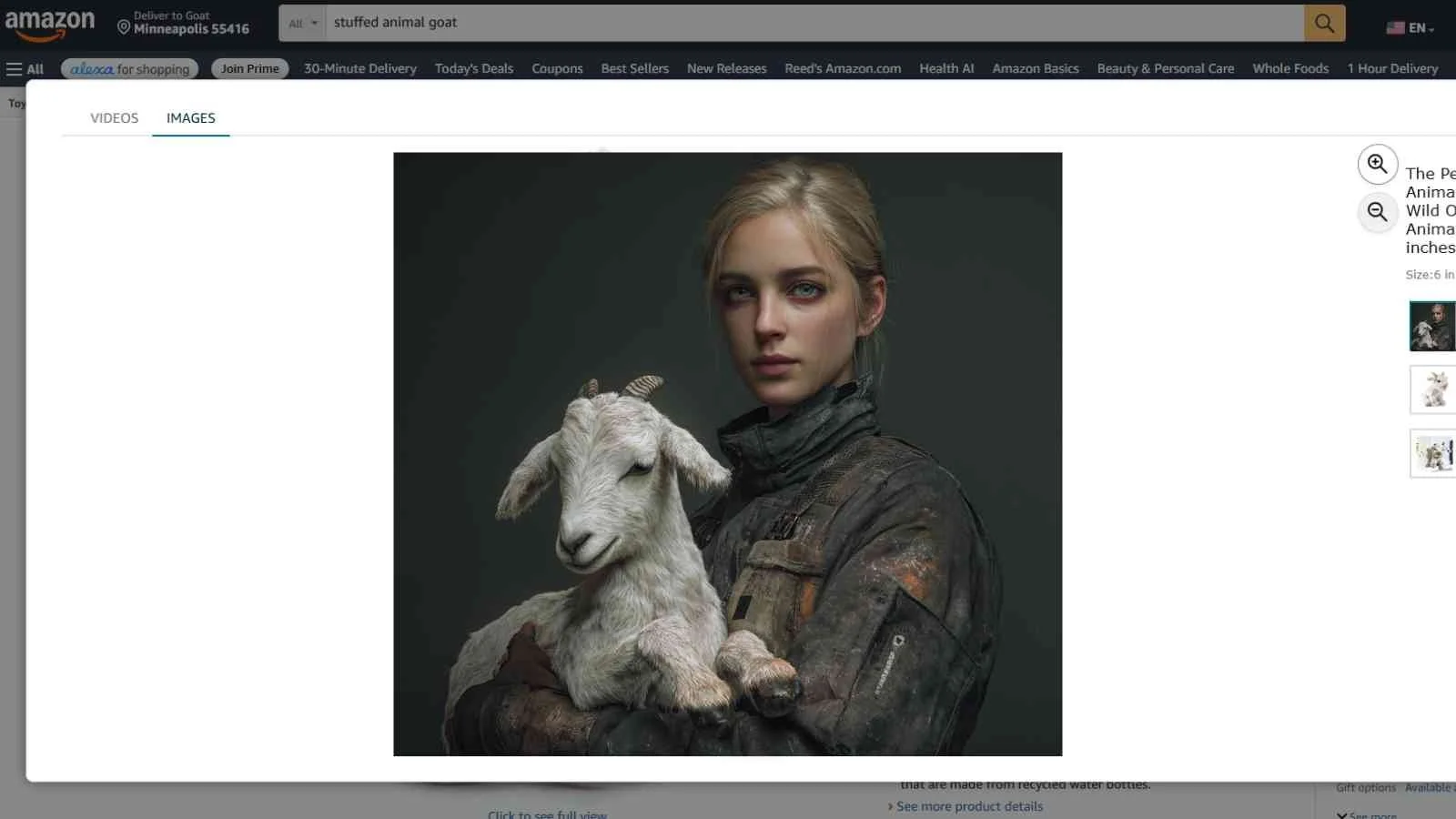
When You Need the Synthetic Performer Tag, and When You Don't
The tag is only for photorealistic people who were fully generated by AI. That distinction does a lot of work, so it's worth being precise about it before you start tagging everything in your catalog. You need the tag when your image or video features a person who was entirely created by AI and looks like a real human. You do not need it when the person in the image is real, even if you used AI tools to retouch or edit that photo, and you don't need it for characters from movies, television, streaming content, video games, or other creative works, such as a movie poster or a video game cover. You also don't need it when there are no people in the image at all, or when any people present are clearly not photorealistic, like an illustration or a cartoon.
| Tag it with contains-synthetic-performer | No tag needed |
|---|---|
| A photorealistic person generated entirely by AI (a synthetic model in a lifestyle shot or A+ image) | A real person, even if the photo was edited or enhanced with AI tools |
| An AI-generated human presenter in a product video | Characters from movies, TV, video games, or other creative works (poster or cover art) |
| Any media where a fully synthetic person appears photorealistic to a normal viewer | Images with no people, or with people who are clearly illustrated and not photorealistic |
The gray area most sellers will hit is the difference between an AI-edited real model and a fully synthetic one. If you photographed a real person and used AI to clean up the background or adjust lighting, that's still a real person and no tag is required. If you generated the model from scratch so that no real human sits behind the image, that's a synthetic performer and it needs the tag. When you're genuinely unsure whether an image crosses the line, the safer move is to tag it, because a disclosure on an image that didn't strictly need one is a much smaller problem than a missing disclosure on one that did.
How to Add the contains-synthetic-performer Tag
Adding the tag means writing one exact keyword, contains-synthetic-performer, into the file's metadata. The value has to match exactly, and it lives in the XMP subject field. Amazon documents three ways to do it depending on your setup, and all three produce the same result. Here's each one.
On Windows, using File Explorer
Right-click the image file and select Properties.
Go to the Details tab.
In the Description section, find the Tags field. This matters, because the Tags field and the Subject field write to different places in the metadata, and Amazon reads the one that the Tags field feeds.
Type contains-synthetic-performer into the Tags field.
Leave the Subject field unchanged.
Select OK.
On macOS, using Preview
Open the image in Preview.
Open the inspector with Command and I together, or select Tools, then Show Inspector.
Click the Keywords tab, which will show "No Keywords" on a fresh file.
Click the plus button at the bottom of the pane, type contains-synthetic-performer, and press Enter so the keyword appears in the list.
With the command line, using exiftool
For video files, for large batches, or on Linux, a cross-platform tool like exiftool is the fastest option. The command to add the keyword to a file is: exiftool -XMP-dc:Subject+=contains-synthetic-performer yourfile.jpg
The plus-equals operator appends the keyword to the existing list instead of overwriting whatever is already there, which is what you want. One thing to watch: running the same command twice writes the keyword twice. Duplicates won't break the tag, but they clutter the metadata, so run it once per file.
Verify the tag before you upload
Whichever method you use, confirm the keyword actually landed in the subject field before you trust it. On Windows, reopen Properties and the Details tab and look at the Tags field. On macOS, reopen the inspector and check the Keywords list. On the command line, run exiftool -G1 yourfile.jpg and look for a line reading [XMP-dc] Subject: contains-synthetic-performer. Verifying takes a few seconds and saves you from uploading a whole batch of images that never actually carried the tag.
Using AI to Create Amazon Product Images the Right Way
The tag is one piece of a bigger question, which is how to use AI-generated images on Amazon without tripping over the rules that were already there. AI imagery is allowed, and plenty of sellers are using it well, but every image you upload still has to meet Amazon's existing product image requirements no matter how it was made. Your main image still needs a pure white background with red, green, and blue color values of 255, the product still has to fill about 85 percent of the frame, and the image still can't carry added text, logos, watermarks, or badges. None of that changes because a tool generated the picture. Amazon's full product image guide lays out the technical and main-image standards, and our Amazon merchandising services team works inside these requirements every day.
The requirement that AI tends to strain the most isn't the new tag, it's the rule that an image has to accurately represent the product. Generative tools are very good at producing an attractive picture and less careful about keeping the product itself true to what's in the box. If the AI shifts the product's color, smooths over a real texture, invents a feature, or shows parts that don't ship with the item, the image no longer represents the product accurately, and that's both a policy problem and a returns problem. A customer who buys based on an idealized AI rendering and receives something that looks different is exactly the customer who leaves a one-star review about the photos. So the practical rule we give clients is simple: use AI for the setting, not for the product. Backgrounds, lifestyle scenes, and the context around the item are fair game, but the product itself should stay honest.
Where AI genuinely helps on Amazon is in lifestyle imagery and A+ Content, the enhanced brand content that brand owners can add to a listing through Brand Registry. A synthetic model in a lifestyle scene or an A+ module can be faster and cheaper than a full photo shoot, and that's fine as long as you tag the fully synthetic people and keep the product accurate. If you're running that kind of imagery in advertising as well as on the detail page, remember that the disclosure obligation under the New York law sits with you as the advertiser, so it's worth keeping a simple record of which creative assets are AI-generated. That record makes it easy to apply the tag consistently, and it protects you as other states and countries move in the same direction. For brand owners building this kind of content at scale, our Amazon advertising services and Brand Registry services teams can help you keep the creative and the compliance aligned.

What the Tag and Disclosure Mean for Your Customers and Conversion
It's natural to worry that a label reading "AI-generated" will make shoppers trust an image less, but the honest read is that transparency tends to help more than it hurts. Customers already assume a fair amount of polish in product photography, and a clear disclosure signals that you're being upfront rather than trying to pass off a synthetic image as a real photo shoot. Buyers who understand what they're looking at set more accurate expectations, and accurate expectations are what drive good reviews and low return rates. That's the same customer-first logic Amazon uses to justify most of its catalog rules, and it usually works in the seller's favor over time.
The downside is entirely on the side of ignoring the rule. If Amazon determines that an image should have carried the tag and didn't, the image can be removed, and if the affected image is your main image and no compliant replacement exists, the listing can be suppressed from search until you fix it. On top of that, the underlying disclosure laws carry real fines that land on you rather than on Amazon. Weighed against a task that takes a few seconds per file, skipping the tag is a poor trade. At Goat Consulting, we help clients keep account health steady by getting details like this right before they turn into suppressed listings or policy notifications, and our Amazon compliance services team can audit your existing catalog if you've already been uploading AI imagery.
How This Fits Amazon's Image and A+ Content Rules
It helps to see the synthetic performer tag as a new line item on the image checklist you should already be running, not as a separate system. It sits right alongside the technical requirements, the main-image rules, and the accuracy standard, and it applies to the same media those rules cover, including A+ Content and video. If you're a brand owner, the A+ modules are the place to look first, because lifestyle imagery with models is common there and it's easy to forget that an A+ image is subject to the same disclosure as a main listing photo.
Because Amazon references its worldwide stores in the requirement, sellers who list internationally should apply the tag everywhere rather than treating it as a United States concern. The disclosure laws driving this are spreading, and building the tagging step into your normal image workflow now is far easier than retrofitting a catalog later. If you'd like a second set of eyes on how your listings and A+ Content are built, our Amazon seller consulting team works with brands and manufacturers on exactly these kinds of catalog and compliance details.
Frequently Asked Questions - Amazon's New Rule for AI-Generated Images
-
It's a metadata keyword that Amazon requires you to add to any image or video containing a photorealistic, fully AI-generated person before you upload it to a listing or A+ Content. You write the exact keyword contains-synthetic-performer into the file's XMP subject field, and Amazon then shows customers a disclosure that the media includes AI-generated people.
-
No. The tag is only for people who were generated entirely by AI. If a real human sits behind the image and you used AI tools to retouch, relight, or clean up the photo, it still counts as a real person, and no tag is required. The requirement applies specifically to synthetic people who were never real.
-
It applies to all of them. Amazon's requirement covers product images, A+ Content, and video that you add to listings across its worldwide stores. Brand owners should pay particular attention to A+ Content, since lifestyle modules with AI-generated models are common there and are just as subject to the disclosure as a main product photo.
-
Amazon can remove the untagged image, and if it's your main image and no compliant replacement exists, the listing can be suppressed from search until you provide one. The disclosure laws behind the rule also carry civil fines that fall on you as the advertiser, so an untagged synthetic performer creates both a listing risk and a legal one.
-
Reopen the file's details and confirm the keyword is present in the subject or keywords field. On Windows, check the Tags field under Properties and Details. On macOS, reopen the Preview inspector's Keywords tab. On the command line, run exiftool -G1 yourfile.jpg and look for a line that reads [XMP-dc] Subject: contains-synthetic-performer.
-
Amazon states that the requirement applies across its worldwide stores, so you should treat it as global rather than limited to the United States. Even though a specific law like New York's is what set this off, the cleanest approach is to tag qualifying media everywhere you list, since disclosure requirements are expanding in other jurisdictions too.
-
Yes. AI-generated images are allowed as long as they meet Amazon's existing image requirements, including a pure white main-image background and an accurate representation of the actual product. Tag any fully synthetic people, keep the product itself true to what ships, and use AI mainly for backgrounds and lifestyle context rather than for altering the product.
-
The immediate driver is New York's AI advertising disclosure law, New York General Business Law section 396-b, which took effect June 9, 2026. It requires a conspicuous disclosure when an advertisement contains a synthetic performer, defined as an AI-generated digital asset meant to look like a real human, and it carries fines of one thousand dollars for a first violation and five thousand dollars for each subsequent one.
Amazon's AI Image Tagging Rule Final Take
The short version is that Amazon now treats a fully AI-generated, photorealistic person in your media as something customers deserve to know about, and the tag is how you tell them. Audit the images and videos in your catalog, identify the ones with synthetic people, add the exact keyword contains-synthetic-performer to each file's subject field, verify it landed, and keep a simple record of which assets are AI-generated so the step becomes routine. If you use AI for imagery going forward, keep the product itself accurate and reserve AI mostly for backgrounds and lifestyle scenes, which keeps you clear of both the new disclosure rule and the older accuracy requirement.
Because this is a new and fast-moving area, treat the specifics as a snapshot. Amazon updates its help pages and policies regularly, and the disclosure laws behind this are still developing, so verify the current requirements in Seller Central and on Amazon's published help pages before you act, and talk to qualified counsel about how any of these laws apply to your business. This post is general information and isn't legal advice.
About the Author
This post was written by Will Tjernlund, the CMO and co-founder at Goat Consulting. Will helps lead the Goat Consulting team and their clients sell on Amazon by increasing sales, mitigating risk, reducing costs, and solving problems. Our team works with brands and manufacturers on listing images and A+ Content every day, including the compliance details that keep products live and accurately represented for Amazon customers. If you want help auditing your AI-generated images or keeping your listings compliant with Amazon's image policies, or assistance with other aspects of selling on Amazon, please reach out through our Contact Us form.