How to List a Product on Amazon Without a UPC or EAN: Product ID Exemption Guide
Updated April 7, 2026
How Do I List a Product on Amazon Without a Product ID or barcode?
This post covers how to list a product on Amazon without a UPC, EAN, or other standard product identifier by applying for a product ID exemption (also called a GTIN exemption) through Amazon Seller Central. If you're a seller with private-label products, handmade goods, generic items, or bundled packs that don't have barcodes from GS1, this process is how you get your listings live without buying UPC codes.
We've helped hundreds of sellers at Goat Consulting navigate Amazon's product ID requirements, and the exemption process is one of the most common things new sellers ask about. The good news is that applying is free, approvals are often quick, and there's no limit on how many times you can reapply if something goes wrong.
What Is a Product ID Exemption on Amazon?
When you upload a new product to the Amazon marketplace, a product identifier is required. Amazon uses these identifiers to match your product to the correct catalog listing, prevent duplicate pages, and give customers confidence they're buying the right item. The most common product IDs on Amazon include Universal Product Codes (UPC), European Article Numbers (EAN), International Standard Book Numbers (ISBN), and Japanese Article Numbers (JAN). All of these fall under the broader category of Global Trade Item Numbers, or GTINs.
A product ID exemption (also referred to as a GTIN exemption) is an approval from Amazon that lets you create a product listing without one of these standard identifiers. It's not a workaround or a gray-area hack. It's a legitimate process built into Seller Central for products that genuinely don't have barcodes, like private-label goods you're manufacturing yourself, unbranded products, or handmade items that were never assigned a UPC.
Once you receive the exemption for a specific brand and category, you can create listings in that category without entering a product ID. The exemption doesn't expire, and there's no recurring fee to maintain it.
When You Need a Product ID Exemption
Not every seller needs to go through this process. If your product already has a valid UPC or EAN from GS1, you should use it. But there are several common situations where you'll need to apply for an exemption as a seller:
You're launching a private-label product that you manufactured or had manufactured under your own brand, and it hasn't been assigned a UPC yet (Frankly, you are better off just getting a barcode)
You're selling handmade goods that don't come with standard barcodes.
You're selling generic or unbranded products that were never assigned product identifiers.
You're selling product bundles or multipacks that you assembled yourself, creating a new combined product that doesn't have its own barcode (There is Amazon Bundles, so this is probably not the best use case but it is viable)
You're selling parts or accessories in categories like automotive or mobile accessories, where individual components often lack their own GTINs.
If your product fits one of these situations, a GTIN exemption can be the right path. Trying to use a random or third-party UPC code instead is a much bigger problem, which we'll get into below.
Why You Should Never Use Third-Party UPC Codes
This is worth calling out specifically because it's a mistake we still see sellers make. Since May 2016, Amazon has required that all UPCs be licensed directly from GS1, the organization that issues and manages barcodes globally. That means purchasing cheap UPCs from third-party reseller websites is not allowed and will cause real problems for your account.
Amazon now actively cross-references the GS1 database when you enter a UPC during listing creation. If the barcode prefix doesn't match your business name and registration in GS1's records, Amazon will suppress your listing. In some cases, repeated use of invalid UPCs can trigger account-level enforcement actions.
The reason Amazon cares about this is straightforward from a customer experience perspective. Accurate product identification means customers get the right product, search results stay clean, and the catalog doesn't fill up with duplicate or mismatched listings. As a seller, using a valid GS1 UPC or a legitimate GTIN exemption protects your account and your customers' trust.
If you don't want to purchase UPCs from GS1, the product ID exemption is the correct and free alternative. [GS1 now offers single barcodes starting at $30, but if you have a catalog of products that genuinely don't need barcodes, the exemption route makes more financial sense.
How to Apply for a GTIN Exemption: Step by Step
As of 2024, Amazon has removed the standalone GTIN exemption application page from Seller Central. You now apply through the product listing creation workflow. Here's how the process works:
Step 1: Start Creating a New Listing
Log in to Seller Central and go to Inventory, then click Add a Product. Search Amazon's catalog for your product. If your product doesn't exist in the catalog (which is expected for brand owners and new products), click "I'm adding a product not sold on Amazon" or "Create a new listing."
Step 2: Select Your Product Category
Choose the most accurate category for your product from Amazon's browse tree. This matters because your exemption is granted at the category level. Selecting the wrong category is one of the top reasons applications get denied. Take the time to find the most specific, accurate category node for your product.
Step 3: Indicate You Don't Have a Product ID
When the listing form asks for a product identifier (UPC, EAN, etc.), check the option that says "This product does not have a Product ID" or a similar variation. Amazon will display an "Apply now" or "Apply for exemption" link.

Step 4: Complete the Exemption Application
The application will ask for your brand name and product category. If you're enrolled in Amazon Brand Registry, enter your exact registered brand name. The spelling, capitalization, and punctuation must match exactly what's in Brand Registry, or your application will be denied. If you're selling unbranded products, select "This product does not have a brand name." Amazon will assign the brand as "Generic."
Step 5: Upload Product Images
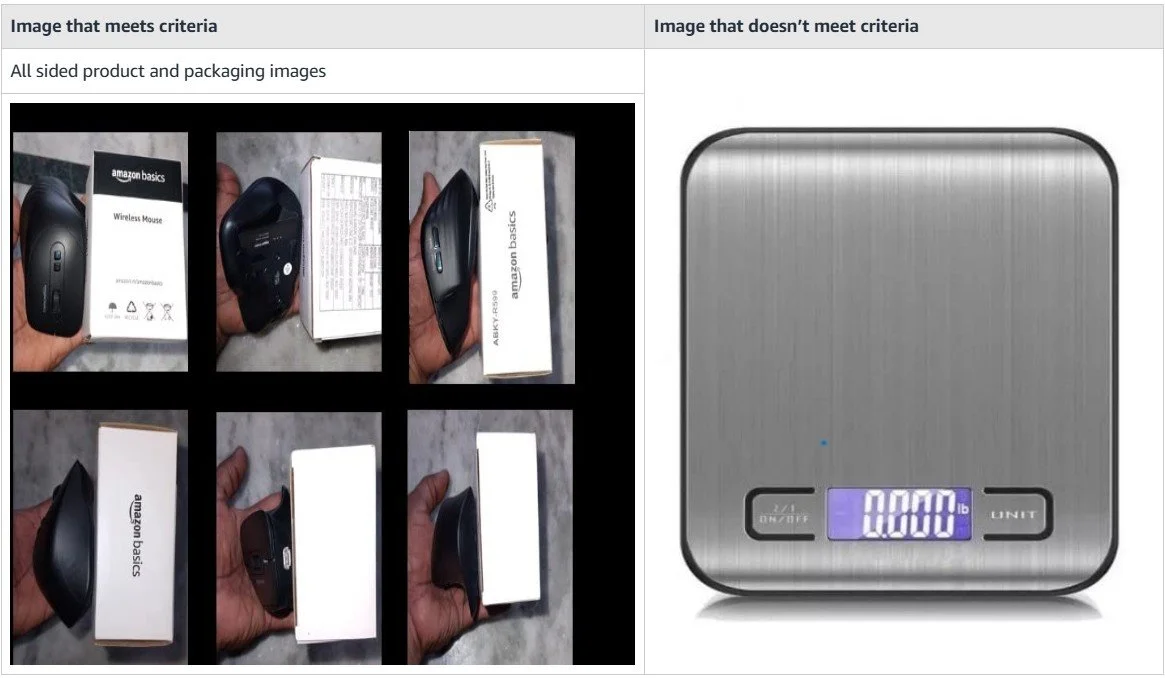
This is where most applications succeed or fail. Amazon requires 2 to 9 clear, real-world photographs of your product. These cannot be digital renders, mockups, or heavily edited studio shots. Your images need to clearly show the product from multiple angles, the packaging (if applicable), any branding on the product, and the absence of a UPC barcode.
Tips for images that get approved:
Use well-lit, in-focus photos taken with a phone or camera (not screenshots)
Show the product, its packaging, and all visible sides
If your product has branding, make sure the brand name is clearly readable in at least one photo
Include a shot showing where a barcode would normally appear on the packaging, demonstrating that there isn't one
Step 6: Submit and Wait
Most applications go through an automated review system and are approved instantly or within a few minutes. Some applications require manual review, which can take 24 to 48 hours. After you receive approval, wait about 30 minutes before creating your listing to give Amazon's systems time to register the exemption across their databases.
What to Do If Your Application Is Denied
Getting denied doesn't mean you can't sell the product. There's no penalty for a denied application, and there's no limit on how many times you can reapply. The key is figuring out what went wrong and fixing it before your next submission.
The most common denial reasons are:
Image quality issues. Blurry, dark, cropped, or low-resolution photos are the number one reason for denials. Retake your photos with better lighting and make sure the product is clearly visible.
Brand name mismatch. If you entered a brand name that doesn't match what's in Amazon's system or Brand Registry, the application will be rejected. Double-check the exact spelling and capitalization.
Wrong product category. If you selected a category that doesn't make sense for your product, Amazon will flag it. Some categories like books, music, and DVDs require standard identifiers and don't allow exemptions at all.
Incomplete information. Vague or missing product details can trigger a denial. Fill out every field completely and accurately.
If you're stuck after multiple denials, reach out to Goat Consulting, we can help clarify what specific issue Amazon flagged with your application. If your exemption is denied or you're stuck on error codes, our Amazon product ID services resolve GTIN and catalog issues directly with Amazon and GS1.
Brand Registry and GTIN Exemptions
Amazon Brand Registry isn't technically required to get a GTIN exemption, but it's becoming increasingly important. Sellers enrolled in Brand Registry tend to have higher approval rates because Amazon can verify their brand identity more easily. If you're not sure whether you qualify, we've covered the requirements to enroll in Amazon Brand Registry in a separate post.
For non-brand-registered sellers, the process still works, but Amazon has been tightening restrictions over time. If you're trying to sell on Amazon without Brand Registry, you may run into additional hurdles like error code 5461. If you're serious about building a private-label business on Amazon, enrolling in Brand Registry gives you benefits well beyond the exemption process, including access to A+ Content, brand analytics, and stronger intellectual property protection.
I always recommend that sellers with their own brands get into Brand Registry before applying for GTIN exemptions. It smooths out the approval process and sets you up with tools that directly improve your customers' shopping experience.
Understanding Amazon's Product ID Types
If you're new to selling on Amazon, the alphabet soup of product identifiers can be confusing. Here's a quick breakdown of what each type is and where it's used:
UPC (Universal Product Code): 12-digit barcode used primarily in the United States and Canada. This is the most common product ID for Amazon.com sellers.
EAN (European Article Number): 13-digit barcode used in Europe, Asia, and most international markets.
ISBN (International Standard Book Number): 10 or 13-digit identifier used exclusively for books and publications.
JAN (Japanese Article Number): 13-digit barcode used in Japan. Functionally equivalent to an EAN.
GTIN (Global Trade Item Number): The umbrella term that covers UPCs, EANs, ISBNs, and JANs. When Amazon says "GTIN required," they're asking for any one of these.
One important note: Amazon's system only accepts 12 or 13-digit GTINs. If you have a GTIN-14 (14 digits), Amazon will reject it during listing creation.
Frequently Asked Questions on How to List a Product on Amazon Without a UPC
-
GTIN exemption is an approval from Amazon that allows you to create a product listing without a standard product identifier like a UPC or EAN. It's designed for products that genuinely don't have barcodes, such as private-label goods, handmade items, and unbranded products. The application is free and the exemption doesn't expire.
-
Most applications are reviewed by an automated system and approved within minutes. Some require manual review, which can take 24 to 48 hours. After approval, wait about 30 minutes before creating your listing to let Amazon's systems sync.
-
No. Since May 2016, Amazon requires all UPC codes to come directly from GS1. Amazon actively verifies UPCs against the GS1 database, and using third-party or recycled barcodes can result in listing suppression or account-level enforcement. If you don't have a GS1 barcode, apply for a GTIN exemption instead.
-
Brand Registry isn't strictly required, but it significantly improves your approval chances. Brand-registered sellers can enter their verified brand name on the application, which Amazon can easily validate. Non-brand-registered sellers can still apply using "Generic" as the brand, but approval is becoming more restrictive for unregistered brands.
-
There's no penalty for a denied application, and you can reapply as many times as needed. The most common reasons for denial are poor image quality, brand name mismatches, or selecting the wrong product category. Fix the flagged issue and resubmit.
-
Categories like books, music, DVDs, and certain media products require standard identifiers (ISBNs for books, for example) and don't allow exemptions. Most other categories support exemptions for qualifying products.
-
No. The application is completely free, and there are no recurring charges. You can apply for exemptions in multiple categories at no cost.
-
A UPC is a specific type of GTIN. GTIN is the umbrella term that includes UPCs (12 digits, used in North America), EANs (13 digits, used internationally), ISBNs (books), and JANs (Japan). When Amazon asks for a GTIN, they'll accept any of these formats in 12 or 13-digit length.
Getting Your Products Listed the Right Way
The GTIN exemption process is straightforward once you understand the requirements. The biggest mistakes sellers make are using third-party UPC codes, submitting low-quality product images, or entering brand names that don't match Amazon's records. Avoid those three pitfalls, and your approval chances go up significantly.
If you're building a private-label brand, take the time to enroll in Brand Registry before applying for exemptions. It makes the process smoother and gives you access to tools that improve how customers discover and experience your products, including listing optimization through better keyword strategy.
For sellers who do need standard barcodes, GS1 now offers individual UPCs starting at $30, which is more accessible than the bulk pricing that used to be the only option.
About the Author - Eric Sutton
This post was written by Eric Sutton, the Operations Manager at Goat Consulting. Eric leads client engagement and Amazon account management for the Goat Consulting team and their clients, helping brands and manufacturers sell on Amazon through listing optimization, advertising, and operational strategy. Eric and the team regularly help sellers navigate Amazon's product identification requirements, GTIN exemptions, and listing creation challenges. If you want help getting your products listed on Amazon or assistance with other aspects of selling on Amazon, please reach out through our contact form.
Originally published November 16, 2020. Updated April 7, 2026.