Amazon INFORM Act Verification Issues and How to Fix Them
This post covers what to do when your Amazon INFORM Act verification doesn't go through. If you sell on Amazon at any real volume, you've either already completed this verification or you're going to be asked to, and we're seeing a lot of sellers get stuck partway through it. Sometimes a bank document gets rejected for a reason Amazon doesn't explain, sometimes the business name on file doesn't match the name on the tax record, and sometimes the whole thing sits in a pending state while Account Health keeps flagging the account as at risk. This post walks through what the law actually requires, where the verification lives in Amazon Seller Central, the annual re-certification that catches sellers off guard, the specific reasons submissions get rejected, and how to prepare your documentation so it passes the first time.
Here's the short version if you're in the middle of one right now. Most INFORM verification failures are caused by a mismatch between the legal business name in Seller Central, the name on your tax record, and the account holder name on your bank account. Fix the underlying information in Settings and Account Info first, submit complete and unedited documents rather than screenshots or crops, open a Seller Support case if the status doesn't move, or reach out to Goat Consulting to help resolve the Amazon INFORM Act Verification issues. You have ten days from the moment you view the certification page.
That clock is the part most sellers underestimate. The INFORM Consumers Act gives you ten days to respond once Amazon puts the request in front of you, and if you don't respond, the marketplace is required by law to suspend your future sales activity until you do. That isn't Amazon being aggressive with policy enforcement. It's a statutory obligation on Amazon's side, which is why appeals that work for other account issues don't get much traction here.
What the INFORM Consumers Act Requires From Amazon Sellers
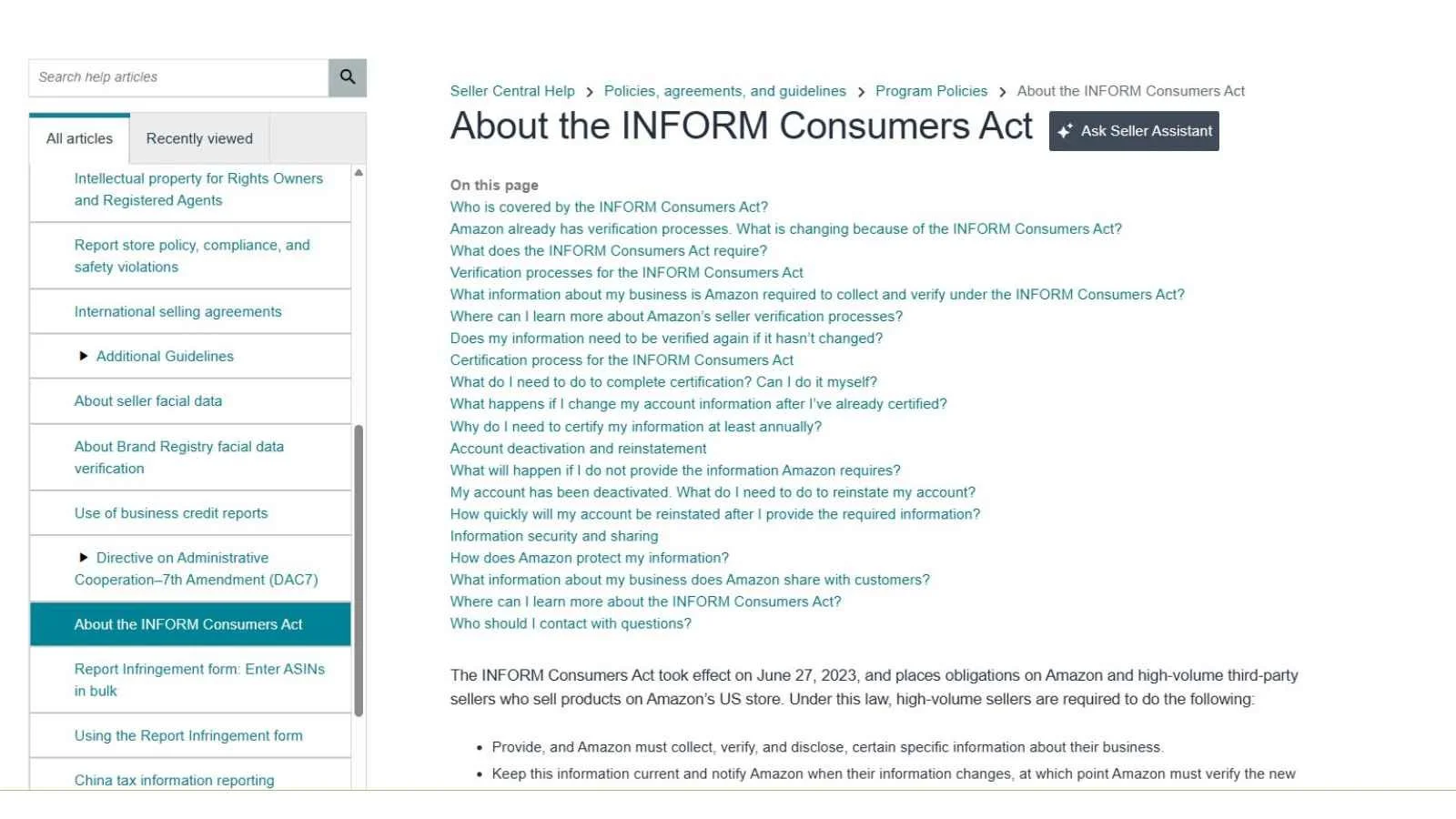
The INFORM Consumers Act is a federal law that took effect on June 27, 2023. It stands for Integrity, Notification, and Fairness in Online Retail Marketplaces, and its purpose is to make it harder for organized retail crime rings to move stolen or counterfeit goods anonymously through online marketplaces. The law doesn't regulate you directly. It regulates the marketplace, and it requires marketplaces like Amazon to collect, verify, and in some cases publicly disclose information about their high-volume sellers. Amazon passes that obligation down to you in the form of a verification request.
You're a high-volume third party seller under the law if you've had 200 or more separate sales or transactions of new or unused consumer products and $5,000 or more in gross revenues during any continuous twelve-month period in the previous twenty-four months on that marketplace. Both conditions are in the statute, though you'll occasionally see Amazon's own seller communications describe the threshold using "or" instead of "and," which has confused plenty of sellers who are over one number and under the other. If you're anywhere near either figure, plan on being asked. You can read the requirement directly in the Federal Trade Commission's guidance for third party sellers under the INFORM Consumers Act.
Once you cross that sales threshold, Amazon has to collect and verify six things from you:
Your name, meaning the individual seller's legal name or the contact person for the business entity
A bank account number, or if you don't have a bank account, the name of the payee for payments issued by the marketplace
A business tax identification number, or a taxpayer identification number if the business doesn't have one
A working email address
A working phone number
A business address, supported by a government-issued identification document or tax document showing the business name and physical address
Every one of those has to be current and it has to be verifiable, which is where the trouble starts. Amazon isn't just recording what you type into a form. It's checking what you typed against a document you upload and against outside records. When those disagree, the submission fails, and the message you get back rarely tells you which piece was the problem.
There's a customer-side reason this matters that's easy to lose sight of when you're staring at a rejected bank statement. A shopper buying from a third party seller has no way to know who's actually behind the listing, and verified seller information is what makes the marketplace something a customer can trust enough to buy from a name they've never heard of. Sellers who keep clean, accurate, verifiable account records are part of what makes the whole channel work, which is the same reason Amazon takes account information seriously across every other part of Amazon policy compliance.

Where INFORM Act Verification Lives in Amazon Seller Central
There are three places in Amazon Seller Central that matter for this, and knowing which one you're in explains a lot about why a submission behaves the way it does.
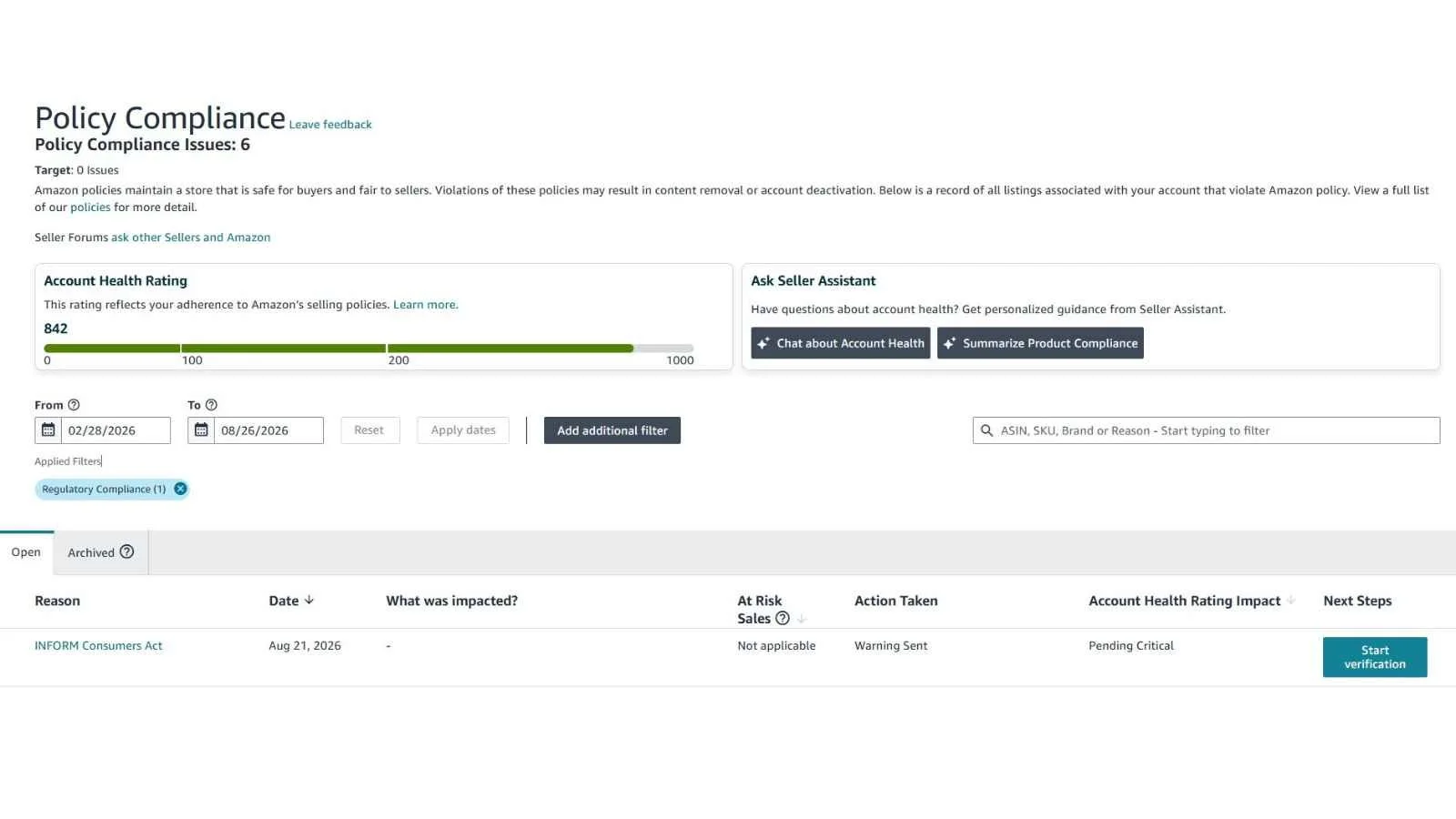
The Account Health page is where the request usually surfaces first. Under Priority actions, you'll see a prompt to review your account information. This is the entry point Amazon points sellers to in its own announcements, and it's the one that shows you whether the account is currently flagged as at risk because of an incomplete verification.
The Notice and Certification page is where you formally certify that your information is accurate. This is the page that starts the ten-day clock. Amazon's own guidance is direct about it: once you view this page, the law requires you to certify your information within ten days. A lot of sellers open that page to see what it says, close it without finishing, and don't realize a countdown just started.
The Account Information page, under Settings and then Account Info, is where the underlying data actually lives. This is where you change a business address, update a bank account, or correct a legal entity name. If something on the certification page is wrong, this is where you fix it before you certify.
The practical sequence is to go to Account Info first, correct anything stale, and only then open the Notice and Certification page. Doing it in the other order is how sellers end up certifying information they meant to update, or how they burn days of a ten-day window waiting on a bank change to process. If you want a step-by-step walkthrough of the submission itself, we covered the base process in our post on how to verify your Amazon account information for the INFORM Consumers Act.
The Annual Re-Certification Sellers Keep Missing
Completing the verification once doesn't close the matter. The law requires marketplaces to make sellers electronically certify, at least once a year, either that their information hasn't changed or that they've updated it. Amazon runs these re-certifications on a rolling basis, and sellers report the same ten-day response window on the annual certification that applies to the original one.
This is the most avoidable version of the problem. The account is fine, the information hasn't changed, and all that's required is clicking through a certification page. But the notice arrives as one more message in a Seller Central inbox that already gets dozens of automated notifications a week, nobody opens it, ten days pass, and Amazon suspends future sales activity because the statute says it has to. We have recently had sellers reach out to us with this story that they were unaware that there was a notification. This is a big thing that Goat Consulting can do is monitor and be on top of these critical notifications, knowing when to take action and what is noise.
Two habits prevent it. First, put a recurring calendar reminder to check Account Health for priority actions on a fixed day each week, and treat anything labeled as an account information review as urgent rather than administrative. Second, make sure the notification email on the account is one a human actually reads. Notification addresses drift over the years, ending up with a former employee, a shared inbox nobody monitors, or an agency that no longer manages the account, and a certification notice sent to any of those is a certification notice nobody sees. If your Amazon notifications are going somewhere you don't check daily, that's worth fixing today regardless of INFORM. Our team handles this kind of ongoing account monitoring as part of Amazon seller consulting work, and catching a certification notice in week one instead of week three is usually the entire difference between a non-event and a suspension.
Start Here: Match Your Symptom to the Fix
If you're already stuck, the fastest way through this post is to find your symptom below and jump to that section. Most sellers arrive knowing what they're seeing on screen without knowing which underlying record is causing it.
| What you're seeing | Usual cause | Where to start |
|---|---|---|
| Submission rejected with no clear reason given | Legal name doesn't match across Seller Central, tax record, and bank | Legal entity name mismatch |
| Bank document rejected or asked for again | Statement missing the account holder name, institution name, or last four digits | Bank account documentation rejected |
| Can't open or complete the bank information form | Known conflict on accounts with Amazon Lending | Bank account documentation rejected |
| Waiting on an address confirmation that never arrives | Mail going to an address you don't physically monitor | Business address verification |
| Never receive the phone or email code | Number routes to a system, or the code is being filtered | Phone and email verification failures |
| Identification document rejected | Image quality, an expired document, or a name mismatch | Government identification rejected |
| Pushed back into the tax interview repeatedly | Tax questionnaire loop on an already-verified US business | The tax questionnaire loop |
| Account Health still says at risk after you submitted | Status lag, or an in-progress review that hasn't closed | Account Health still shows at risk |
| Verification submitted itself and failed, with no appeal button | Auto-submission against outdated account information | Auto-submitted with outdated information |
| Nothing matches because the business changed | Entity conversion, ownership change, or a new tax identification number | Entity changes and account transfers |
Common INFORM Act Verification Issues and How to Fix Them
Legal entity name mismatch
Name mismatches cause a lot of rejections, and they're rarely obvious to the seller because every individual document looks correct on its own. The problem is that the legal business name in Seller Central, the name on the IRS record tied to your tax identification number, and the account holder name on the bank account all have to describe the same entity. A business that registered as "Northshore Outdoor Supply LLC" with the state, files taxes as "Northshore Outdoor Supply, LLC," and holds a bank account under a doing-business-as name of "Northshore Gear" can fail verification even though nothing about that setup is improper.
The fix is to pick the exact legal name as it appears on your formation documents and IRS records, then make Seller Central and the bank account match it, including punctuation and the LLC or Inc suffix. Update Account Info first, let the change settle, then certify. If the bank account is the piece that doesn't match, a bank letter on letterhead confirming the account is held by the legal entity generally works where a statement showing a doing-business-as name does not. This is the same records discipline that keeps you out of trouble elsewhere in Amazon compliance work, and it's worth getting right once. If the mismatch exists because the business changed hands, the fix is bigger than a name correction; our post on transferring an Amazon seller account after an acquisition covers the order to make those changes in so the update doesn't trigger a verification hold.
Bank account documentation rejected
Amazon needs to confirm that the bank account receiving your disbursements belongs to you or your business, so the document has to show the account holder name, the bank name, and the last four digits of the account number, all legible in the same file. Pull a current statement rather than reusing an old one, since stale documents get rejected.
Credit union statements are a recurring problem, because many of them don't display the account number in a form Amazon can read. Amazon's own guidance for this case is to request a bank letter from the credit union stating that the specific account is held under your name or your business name, and that letter usually resolves it. Cropped or partially redacted documents fail as well, so upload the full page even when it feels like more information than the situation requires, and send a clear scan or photograph rather than a screenshot of a banking app, since app screens don't carry the header information Amazon reads.
There's one bank-side issue that isn't your fault and doesn't need fixing. Sellers with Amazon Lending have reported being unable to access the bank information form at all, and Amazon has acknowledged that conflict and stated it won't hold disbursements over it. If that's your situation, document it and don't burn days trying to force the form.
Business address verification
Amazon has to verify the physical business address, and depending on the account that can include confirming a code sent to the address on file. This step trips people up in predictable ways, and all of them come down to the same thing: the address in Account Info needs to be a place where you actually receive and read mail.
A virtual office, a registered agent address, or a mail forwarding service can technically receive it, but if the service scans and forwards on a delay, or discards items it treats as marketing, the confirmation can expire or never reach you. Home-based sellers who list a business address different from where they receive mail hit the same wall. Apartment and suite numbers that are on the lease but missing from the Seller Central record cause non-delivery too.
Before you start, confirm the address in Account Info is one where mail physically arrives, including the suite or unit number, and tell whoever handles your mail that something from Amazon is coming and matters. If a code expires you can generally request another, but each cycle costs you days you may not have inside a ten-day window.
Phone and email verification failures
Amazon verifies the phone number and email address by sending a code, and you get a limited number of attempts before you're locked out of that path. Numbers that route through an automated attendant or a main office line can fail, because the verification call or text needs to reach a handset rather than a system. Voice over internet protocol numbers and virtual phone services are inconsistent. Email codes land in spam or get stopped by an aggressive corporate mail filter.
Use a direct mobile number that a person answers, and an email address on a domain that isn't filtering aggressively. If you're going to change either one, change it in Account Info before you open the certification page rather than in the middle of a verification attempt.
Government identification rejected
For identity verification, Amazon wants a valid, unexpired government-issued photo identification, and depending on the account it may also request a video verification call. Rejections here are usually about image quality or a data mismatch rather than the document itself. Glare across a laminated surface, a cropped edge, a photo taken at an angle, an expired document, or a name that doesn't match the account holder name in Seller Central will all bounce the submission.
Photograph the identification flat, in even light with no flash, with all four corners visible and every line of text readable. If the name on your identification differs from the name on the account because of a marriage or a legal name change, resolve the Seller Central record first so the two agree, and have the supporting document ready in case Amazon asks why they differed.
The tax questionnaire loop
Some sellers get pushed into the tax interview repeatedly even though their tax information is already on file and correct, and some see a tax questionnaire that doesn't present a United States option fitting their situation. Amazon has stated in seller communications that businesses registered in the United States with already-verified tax information don't need to resubmit. If you're in a loop on an account whose tax interview is complete and whose information hasn't changed, document it with screenshots and escalate through Seller Support rather than resubmitting repeatedly, because each resubmission can restart a review you were already partway through.
Account Health still shows at risk
Status changes are not instant. After a successful submission, the Account Health page can take up to twenty-four hours to reflect the new state, and the underlying review can run longer than that. The status indicators are worth reading carefully, because a green check means verified and no action is needed, while a circle with a link means something is either awaiting your submission or in progress on Amazon's side.
The distinction that matters is between "in progress" and "action required." Amazon's guidance has been that an account showing information in progress will not be deactivated while that review runs, which is the reassurance most sellers are looking for at this stage. If it says action required, the ball is in your court and the clock is real. If an in-progress item hasn't moved in several business days, open a case and keep the case identification number, because a documented, time stamped record of your attempts is the most useful thing you can have if this escalates toward account deactivation
Auto-submitted with outdated information
Sellers have reported a verification that gets submitted automatically using whatever information was already on the account, fails because that information was stale, and then presents no obvious appeal button to correct it. If you're in that position, correct the underlying data in Account Info, then open a Seller Support case that specifically references the INFORM Consumers Act verification and asks for the verification to be re-triggered against the corrected information. Attach the supporting documents to the case rather than waiting for a form to reappear.
Entity changes and account transfers
If your business has changed hands, converted from a sole proprietorship to an LLC, obtained a new employer identification number, or moved the selling account between entities, INFORM verification will surface every inconsistency that change left behind. The same is true for sellers running more than one account, where information drifts out of sync over time.
These cases need to be sequenced rather than rushed. Get the entity, tax, and banking records aligned outside of Amazon first, update Seller Central to match, and only then certify. Trying to fix an entity mismatch inside a ten-day certification window is how a solvable records problem becomes a deactivation. This is the situation where bringing in help early pays for itself, and it's the kind of work we can assist with.
How to Open a Seller Support Case That Actually Moves
Several of the fixes above end in "open a case," and the quality of that case decides how many rounds you spend. The pattern that works is to state which verification you're in, what you corrected, what you attached, and what you want Amazon to do, in that order, without argument or backstory. Support associates handling these are looking for a clear request and matching documentation, not an explanation of how frustrating the process has been.
Here's a structure you can adapt. Replace the bracketed pieces with your details:
Hello,

This account has an open INFORM Consumers Act verification requirement.
The submission was [rejected / auto-submitted with outdated information /
stuck in progress since DATE].

I have corrected the following in Settings and Account Info:
- [Legal entity name updated to match IRS records and bank account]
- [Business address corrected to include suite number]
- [Bank account updated / bank letter obtained]

Attached:
- [Bank letter on institution letterhead showing account holder name and
  last four digits]
- [Government-issued photo identification, unexpired]
- [Tax document showing business name and physical address as registered]

Please re-review the INFORM Consumers Act verification against the
corrected information and confirm the status of the certification
requirement on this account.

Merchant token: [TOKEN]

Thank you,
[NAME], [TITLE]
Keep the case identification number for every exchange, and reply within the same case rather than opening new ones, since a single case with a documented history is far more useful than five separate threads saying the same thing. If you're managing this alongside other account health work, our Amazon seller consulting team does this kind of documented follow-through as a matter of course.
What Happens If You Don't Complete the Verification
The consequences here are not discretionary on Amazon's part. Under the statute, when a high-volume seller fails to provide the required information or fails to certify, the marketplace must suspend that seller's future sales activity until the seller complies. That's the language of the law, and it's why this doesn't respond to the kinds of arguments that sometimes work on other enforcement actions.
In practice you can see any combination of a few things. Your listings can stop being available for purchase while the account is in a suspended sales state. Disbursements can be withheld until verification completes, which is often the part that hurts most, because inventory is sitting in fulfillment centers and capital is tied up. And the account can be deactivated outright if the situation goes unresolved, at which point you're in a full reinstatement process rather than a verification process. If you've already reached that point, our guide on what to do when your Amazon account is suspended walks through how reinstatement works, and if funds are being held alongside the deactivation, our post on the Amazon Section 3 violation covers what that looks like.
There's one piece of good news worth holding onto. INFORM verification is a documentation problem, not a conduct problem. Nobody is accusing you of selling counterfeits or violating a policy. You're being asked to prove that the entity behind the account is who it says it is, and that's a solvable problem in nearly every case as long as you address it inside the window you're given.
Preparing Your Documents So the Submission Passes the First Time
Most of the failures above share one cause, which is that the seller assembled documents reactively after Amazon asked rather than having a consistent set ready. Building that set once takes an afternoon and saves you the annual scramble.
Start by writing down your exact legal entity name as it appears on your formation documents, and treat that string as the single source of truth. Then confirm the same string appears on your Seller Central legal entity field, your IRS records for the tax identification number you use, and the account holder name on your disbursement bank account. Where any of the three disagrees, fix the record rather than the form.
Then keep this set current and in one folder.
| Document | What it has to show | Common reason it fails |
|---|---|---|
| Bank statement or bank letter | Account holder name, institution name, date, last four digits of the account number | App screenshot instead of a statement, or a credit union format that hides the account number |
| Government-issued photo identification | Unexpired, all four corners visible, every line readable | Glare, an angled photo, a cropped edge, or a name that doesn't match the account |
| Tax document | Business name and physical address exactly as registered | Legal name punctuated differently than the Seller Central record |
| Address proof (utility bill or lease) | Business name and the full address including suite or unit | Missing unit number, or an address you don't physically monitor |
Finally, confirm that the phone number on the account reaches a person directly, the email address reaches an inbox someone reads daily, and the business address is one where mail physically arrives. Those three take five minutes to check and sit behind a lot of failed verifications. Running through this list once a quarter alongside your other account hygiene work, the same way you'd review your compliance information for your products.
The Public Disclosure Requirement at $20,000
There's a second half of the INFORM Consumers Act that gets far less attention than the verification, and it applies to a subset of high-volume sellers. If you're a high-volume third party seller with $20,000 or more in annual gross revenues on the marketplace, the law requires the marketplace to disclose certain information about you to consumers on the product listing page. That includes your full name, your physical address, and contact information that allows customers to communicate with you directly.
Amazon implements this through the seller information displayed on your storefront and detail pages. What sellers should understand is that the address shown there is the one on your account, so if you're operating out of a home and you haven't set up a business address, that home address can end up publicly visible. The law does provide narrower treatment in specific circumstances, including for sellers who don't have a separate business address, but the default assumption should be that the address on your account is going to be seen by customers.
The practical move for anyone selling at that level is to establish a real business address that you're comfortable displaying and that reliably receives mail, since the same address has to work for both the private verification and the public disclosure. Doing this well is also good for the customer, because a shopper who can see a legitimate business behind a listing and reach a real contact is a shopper who buys with more confidence and comes back. You can read the full disclosure requirement in the FTC's INFORM Consumers Act statute page.
When to Bring In Help
Plenty of INFORM verifications are straightforward, and if your records are clean and your documents are ready you should be able to complete one yourself in a single sitting. Handle it yourself when the information hasn't changed, the entity is simple, and you're inside the window.
Get help when the clock is short and the records don't line up, when the business has gone through an entity change or an ownership change, when you've already had a submission rejected and don't know why, or when the account has been suspended or disbursements are being held. Those situations reward experience with how Amazon's verification reviews behave, and they punish trial and error, because each failed resubmission can restart a review you don't have time to restart. Contact us at Goat Consulting and we will help work through whatever issues you are facing.
Frequently Asked Questions About Amazon INFORM Act Verification
-
That depends on which documents Amazon needs to verify and whether they pass on the first pass. What's predictable is the Account Health page, which can take up to twenty-four hours to reflect a completed submission, and anything requiring a mailed confirmation, which depends on physical mail delivery. Your ten-day certification window runs regardless, so start early rather than waiting on a review to finish.
-
The INFORM Consumers Act requires the marketplace to suspend a high-volume seller's future sales activity until the seller provides the required information. On Amazon that can mean listings becoming unavailable, disbursements being held, or the account being deactivated if the issue goes unresolved. Completing the certification is what lifts it.
-
Usually because the document doesn't show the account holder name, the institution name, and the last four digits of the account number all in one legible file, or because the account holder name doesn't match the legal entity name in Seller Central. Credit union statements are a frequent offender, and Amazon's stated fix is a bank letter on institution letterhead confirming the account is held under your name or your business name.
-
Yes. The law requires marketplaces to have high-volume sellers certify at least annually that their information hasn't changed or has been updated. Amazon issues these re-certifications on a rolling basis and sellers report the same ten-day response window, so the annual notice needs the same urgency as the original request.
-
Amazon's guidance ties it to the page. Once you view the Notice and Certification page, the law requires you to certify within ten days. Opening that page to see what it says without finishing is a common way sellers lose days off the window without realizing it.
-
Give it up to twenty-four hours, since status updates aren't instant. If the item shows as in progress, Amazon's guidance has been that the account won't be deactivated while that review runs. If it still shows action required after a day, or an in-progress item hasn't moved in several business days, open a Seller Support case and keep the case identification number.
-
Sellers who meet the high-volume threshold, which the statute defines as 200 or more separate sales of new or unused consumer products and $5,000 or more in gross revenue during any continuous twelve-month period in the previous twenty-four months. If you're close to those numbers, expect Amazon to ask.
-
If you're a high-volume seller with $20,000 or more in annual gross revenue on the marketplace, the law requires your name, physical address, and contact information to be disclosed to consumers on the listing page. Whatever address is on your account is the address that gets used, so sellers at that level should establish a business address they're comfortable displaying.
-
There isn't a policy appeal in the usual sense, because the marketplace is following a statutory requirement rather than making a discretionary enforcement decision. What works is correcting the underlying information in Account Info, then opening a Seller Support case that references the INFORM Consumers Act verification directly and attaches the corrected documentation.
Wrapping Up Amazon INFORM Act Verification
Nearly every INFORM verification problem is a records problem in disguise. The legal entity name, the tax identification number, and the bank account holder name have to describe the same business, the address has to be one where mail actually arrives, and the phone and email have to reach a person. Get those aligned once, keep the document folder current, and the annual certification becomes a five-minute task instead of a threat to your selling privileges.
If you're in the middle of a failed verification right now, work in this order:
Correct the underlying information in Settings and Account Info before you touch the certification page.
Gather complete, unedited documents rather than screenshots or crops, and make sure the names on all of them match.
Submit once. Resubmitting repeatedly can restart a review you were already partway through.
Reach out to Goat Consulting and we will help you navigate your issue
If the account has already been suspended or disbursements are being held, treat it as urgent, because the resolution path only gets longer from there.
This post is general information about a federal law and about Amazon's implementation of it, not legal advice. Amazon changes its verification interface and its documentation requirements periodically, and your circumstances may differ, so confirm current requirements in Seller Central and consult an attorney for advice specific to your business.
About the Author - Reed Thompson
This post was written by Reed Thompson, the CEO at Goat Consulting. Reed helps lead the Goat Consulting team and their clients sell on Amazon by increasing sales, mitigating risk, reducing costs, and solving problems. Account verification and account health work is a regular part of what the team handles, from routine INFORM Act certifications to accounts that have already been suspended over an incomplete submission. If you want help getting an INFORM Act verification through, or assistance with other aspects of selling on Amazon, please reach out through our Contact Us form.